Distributed builds of LLVM with CMake, recc, and NativeLink
Fast Builds Rock
Let’s face it: Slow builds are a PITA! Many of us in the LLVM community have spent a lot of time optimizing builds, analyzing transitive header includes, working on modules, working on PCH, tweaking shared library builds, on and on and on in search of more reasonable build times. However, the quest is Sisyphean and unending.
Compile time is elastic and usually not monitored. Your team will add code and header bloat until it hurts, and if you have enough resources, they’ll form a subteam to own the problem, and they won’t have any power to lean out your messy include graph, which is the real driver of quadratic compile time. They’ll just build more sophisticated infrastructure to hide the problem. In some ways, this is progress, people usually don’t like thinking about dependency graphs, but I digress. The point is, this post is my personal escalation in a long, never-ending war on compile time, that is only more important if you think it’s important to keep the LLVM development feedback loop tight.
Since leaving Google, I’ve been really fixated on the idea of distributed builds, so I spent some time evaluating the state of the landscape, trying to figure out if there’s something here the LLVM community can use. In the end, my cluster was able to build LLVM four times faster than my laptop, going from 1026s to 253s. Speed depends a lot on hardware, but read on if you want to learn more about how this worked.
Personal History
Working at Google, I was very aware of its internal distributed build system, which solves this problem by distributing build actions at massive scale. The system was partially open sourced as Bazel. I say “partially” open source, because Bazel was a client for a protocol with no reference implementation. The internal distributed build service relied on too much internal Google infra, aka Borg, the predecessor to Kubernetes.
Chromium had its own parallel distributed compilation system called goma,
which my team borrowed for LLVM development, and it worked very well for our
purposes (-j400-ish builds), until it was replaced with reclient. The build
team wanted to make Chrome a customer, and reclient was their offering, but
it didn’t work for LLVM.
The key blocker for reclient was absolute and relative paths. In remotely
executed distributed builds, you want to avoid actions depending on the current
working directory to enable sharing the action cache between builds in
different directories. Julio Merino has several good
posts on the action cache if you want to read more. This
makes sense, but previously, goma would do a lot of the work of interpreting
the command line and massaging it into a form that works for remote execution.
rewrapper was a dumb client: it did not parse command lines, it simply used
some logic to forward inputs and execute the action remotely. This is nice in
principle, but not suited to operating in a hostile environment, i.e. CMake.
CMake had a flag called CMAKE_USE_RELATIVE_PATHS that held out
some promise that this could be made to work, but it was removed in CMake 3.4.
If you were not aware, LLVM has another self-supported build system for
gn, Chromium’s build system. For a time, we were able to use this
with reclient, rewrapper, but in reality, workstations kept getting faster,
Google rolled out mega-size VMs in the cloud for development, so this stopped
being important to me and my team.
Then I left Google, and now I’m back to banging rocks together. No 96 vCPU VMs for me, at least not today, hence my renewed interest in these systems.
The Bazel Option
You may be aware that LLVM has a Bazel build system that is officially unsupported but maintained by a subset of the community with some help from automated tools. Bazel speaks the remote execution protocol, so does that allow fast builds? Initially, Bazel had no RE implementation, but eventually several arose, including NativeLink, which I’ll cover later. However, I actually don’t plan to use or promote Bazel.
Bazel is super heavy-weight, and I just don’t like the ergonomics for local builds. The Java server eats a lot of memory. Julio Merino is right, it needs a Rust rewrite. I’m sure Java can be fast, but this is really a space where a performance engineer should come in and tune the data layout with a real systems language.
If Rust-Bazel existed, I think it would be a much easier sell to get projects like LLVM to support and maintain Starlark BUILD files. Developers would have two options: a lean and fast local build system, and the option to trade up for a fancy build-in-the-cloud system, which I believe the Bazel folks are pursuing. I’ll keep an eye on the sky for this development, but in the meantime, I’ll keep using the OSS industry standard tools, even if they are painful.
Personal Cluster
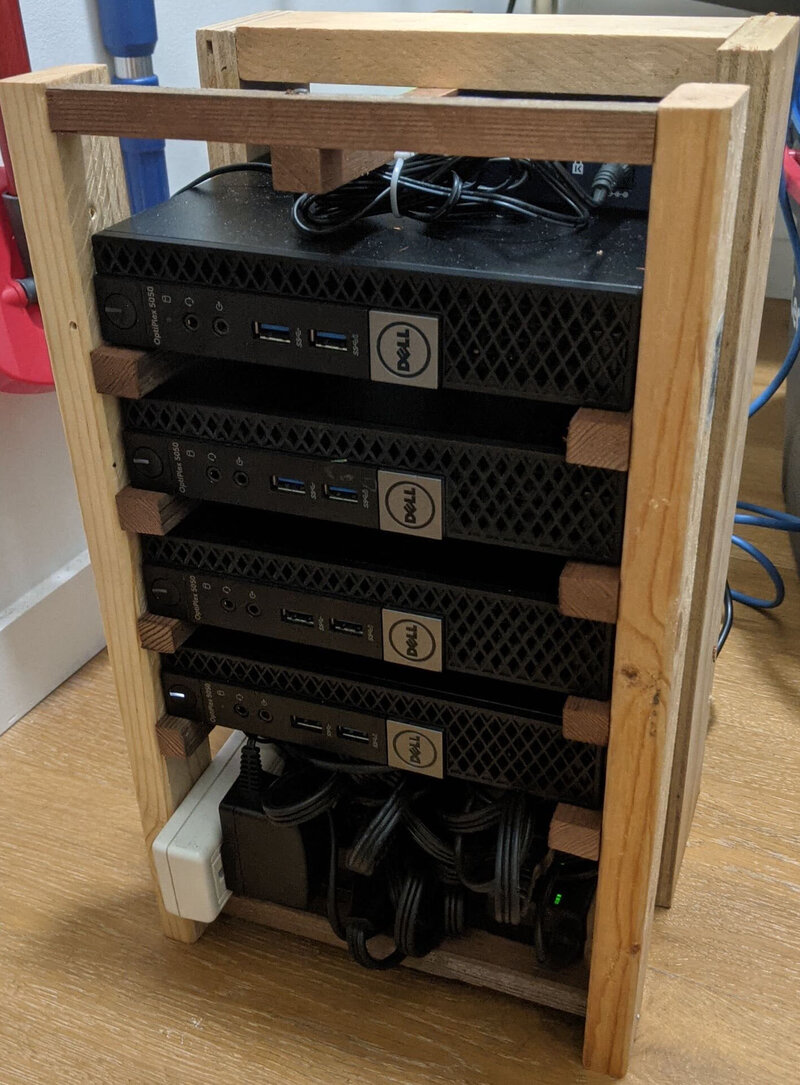
When I left Google, I wanted to take some time to meet LLVM where it is, and to think about what a distributed build system that works for LLVM would look like. I also put a lot of time into spinning up a Kubernetes cluster, pictured right. These aren’t the most powerful machines, and they mostly act as control nodes. I’ve joined some not-pictured nodes to the cluster to give it some more power for this demo. The point here is to prove the concept, so others can copy the idea with beefier hardware. The cluster uses Talos Linux. The cluster deserves its own dedicated post, so we’ll leave it out of scope, even if it is cute.
Remote Execution Service Landscape
When Google open-sourced Bazel, there were some nascent plans to sell Remote Execution as a service in Cloud. However, priorities changed, the build team left Cloud, and all we were left with was the client and the protocol. Later, some Bazel experts eventually decided to leave Google and found EngFlow, which is a company that sells proprietary remote execution as a service. I’m sure it’s a great product, but for my purposes, if it’s not FOSS, that’s not something I can promote as a real solution in the LLVM community, so I’ve limited my search to open-source remote execution implementations.
Fast forward almost a decade, and now there are multiple reimplementations of the Bazel Remote Execution protocol. The Bazel community documents a list of remote execution service implementations, and these are the self-service / OSS ones:
- Buildbarn: Go
- Buildfarm: Java, reference implementation
- BuildGrid: Python
- NativeLink: Rust
Honestly, I decided to evaluate NativeLink because they advertised at OSSNA ‘25 in Denver when I attended. I followed my curiosity, and got in touch with Marcus Eagan, the creator and founder. I didn’t do an exhaustive competitive analysis of these solutions, but just based on the Rust language choice, I’m inclined to assume it has good performance. The history docs say, “This project was first created due to frustration with similar projects not working or being extremely inefficient,” which suggests it is a second-system that strives to beat the competition.
At the end of the day, performance is primarily determined by the compute resources you’ve rented or purchased to run the actions, and I’m working with scraps here, so don’t read too much into the performance of NativeLink from this experiment.
Note that NativeLink uses the Functional Source License, which places restrictions on commercial usage. I am not a lawyer, but I believe my usage of the code is permitted under the license, since I’m mainly trying to build a demo.
It took me a lot of fooling around with Claude, kubectl, manifests, fits and
starts, Garage, S3, and other nonsense, before I got a working setup, but I
made it through. In the end, I used a very simple configuration with a
scheduler pod, a cas pod, a worker pod for every node, and a filesystem cache
on one of my nodes, scrapping the unneeded S3 storage layer. The Kubernetes
NativeLink on prem getting started docs use kind and FluxCD
(IIRC), which I found to be pretty clunky, so I skipped that.
The key thing to make this work is to create a dev container for your build, so I’ll cover that next.
Development Containers
Dev containers contain all the system dependencies and build tools that your project depends on, i.e. your compiler, your standard library, cmake, whatever.
I started by copying the dependencies and binaries from LLVM ci-ubuntu
containerfile, since that’s what’s tested, and it has an LTO /
Bolt optimized LLVM toolchain. NativeLink itself is a single, statically-linked
binary, so you can take the regular worker image and simply inject it into your
new image wherever you like, say /usr/local/bin/nativelink. I published my
Containerfile on GitHub if you want to read it in full.
Here are some fragments to give you a sense of how it works:
 1# Extract nativelink binary from the Nix store.
 2FROM ghcr.io/tracemachina/nativelink:v1.0.0 AS nativelink
 3FROM busybox AS extract-nativelink
 4COPY --from=nativelink / /nativelink-image
 5RUN cp /nativelink-image/nix/store/*/bin/nativelink /nativelink
 6...
 7
 8# Copy the pre-built LLVM sysroot (/opt/llvm) from the CI image.
 9FROM ghcr.io/llvm/ci-ubuntu-24.04:latest AS llvm-toolchain
10COPY --from=llvm-toolchain /opt/llvm /opt/llvm
11...
12
13# Shared base: packages for building recc AND for LLVM development.
14# The -dev packages (for recc) are supersets of the runtime libs, so
15# installing them here avoids a second apt-get update in the final image.
16FROM docker.io/library/ubuntu:24.04 AS base
For my purposes, I chose to have this container serve as both my development workspace container, and the worker container. I could optimize things by stripping recc and Bazel out of the remote worker container and removing nativelink from the dev container, but disk is cheap, relatively speaking, despite the AI storage crunch.
Distrobox
I mentioned dev containers to a teammate at work, and they said that they found
them painful, because the container filesystem is ephemeral. It gets deleted
when you recreate the container with a fresh image. I’d say that
distrobox is the solution to this problem. It makes development
containers so much easier to use. The basic idea is that distrobox bind
mounts your home directory, matches your existing user ID (same FS
permissions), and you run development tools in that context. It’s basically a
build chroot from back in the day, all grown up.
You can bind mount /work or some other global path if that’s what you use,
too, the important thing is that you try to avoid global modifications to the
container image, since those won’t persist. The source files and build
artifacts should remain rooted in your shared workspace, so you don’t lose
them. If you build static libraries with zero shared library dependencies,
they’ll even run outside your dev container, but that’s a separate topic.
One of the rough edges here is that your dev container might not have your
favorite command line development tools. You can install tools to ~/bin/ or
~/.local/bin/ and use them in your dev container, or create a custom image
layered over the base dev container to add the tools you need.
Here’s a quick example of how you can set up an LLVM development container with distrobox, without any distributed build nonsense:
 1# Build the container image from llvmdev/Containerfile
 2podman build -t registry.reidkleckner.dev/llvmdev:latest llvmdev
 3
 4# Push the image to some registry (mine, or ghcr.io)
 5podman push registry.reidkleckner.dev/llvmdev:latest
 6
 7# Check out some sources, wherever
 8cd ~
 9git clone https://github.com/llvm/llvm-project.git
10
11# Create the container from your custom image
12distrobox create -i registry.reidkleckner.dev/llvmdev:latest llvmdev
13
14# Execute a shell in the llvmdev container.
15distrobox enter llvmdev
16
17# Build as normal:
18mkdir llvm-project/build
19cd llvm-project/build
20cmake -GNinja ../llvm ...
21ninja check-llvm
22
23# You can leave and come back:
24exit                       # Returns to parent shell
25distrobox enter llvmdev    # Return to container
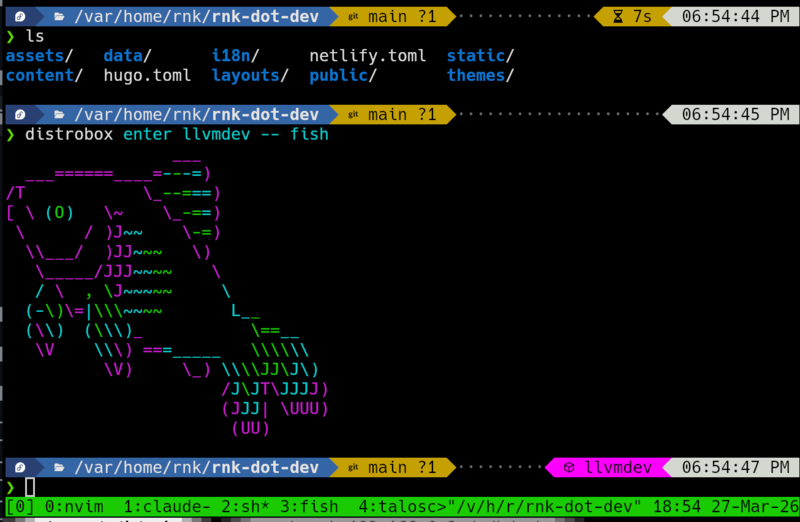
Distrobox tweaks the bash shell prompt to indicate when you’re in the distrobox container so you don’t get confused. I use fish and tide, which show this as well. You can keep the editor outside or inside, your choice, but IDE users will keep them outside to integrate with OS graphics libraries.
Validate NativeLink with Bazel
While I said earlier that I’m not interested in using Bazel to build LLVM, it
is the reference implementation of the RE protocol, so it’s the logical tool to
use to test the service. I installed bazelisk into the devcontainer on PATH
(src).
To make Bazel work as a client you have to define a cc_toolchain, which
defines where all the system headers are. This is not the focus of this post,
so I will say that Claude figured it out, and the results are in the
build_rbe directory with a README file if you want to
read more about it. Bazel has a way to auto-generate these paths, given a
container, if I recall. You need to place the user.bazelrc from that
directory in llvm-project/utils/bazel and build in that directory.
 1❯ distrobox enter llvmdev
 2
 3❯ cd llvm-project/utils/bazel/
 4
 5❯ bazel build -j 96 --config=remote-exec  @llvm-project//clang:clang
 6Starting local Bazel server (8.6.0) and connecting to it...
 7INFO: Invocation ID: 9eef8e99-10c2-464e-a1f2-7652e387c88d
 8INFO: Analyzed target @@+_repo_rules+llvm-project//clang:clang (103 packages loaded, 14938 targets configured).
 9[829 / 5,479] 96 actions, 65 running
10    Compiling llvm/lib/Demangle/ItaniumDemangle.cpp [for tool]; 2s remote, remote-cache
11    Compiling llvm/lib/Demangle/MicrosoftDemangleNodes.cpp [for tool]; 2s remote, remote-cache
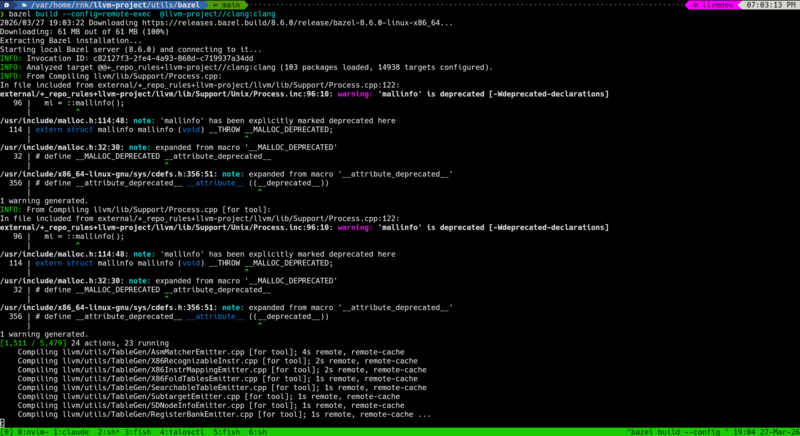
Here’s visual evidence it worked:
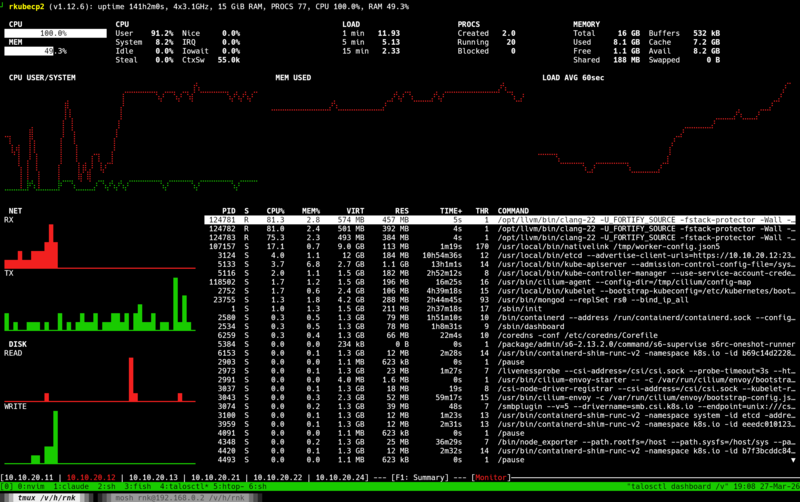
Here’s the Talos dashboard, showing the clang processes and 100% CPU usage:
Great! We did it, NativeLink and Bazel are configured. Let’s move on to CMake.
Reclient / Rewrapper
Initially I evaluated REclient, a Bazel build project. This thin
command wrapper wraps individual commands and sends them over the wire.
However, it doesn’t work with CMake generated build.ninja files because, as I
mentioned earlier, CMake uses absolute paths to refer to source inputs.
I came up with the idea of post-processing the CMake output to rewrite the
paths to be relative. I asked Claude to do this, and it came up with
relativize_build_ninja.sh. Surprisingly, this worked, but
it’s a pretty awful solution. I didn’t like the idea of relying on a vibe-coded
shell script to post-process my CMake output. That said, the fact that this
worked at all made me somewhat annoyed that the CMake folks abandoned the
CMAKE_RELATIVE_PATHS feature. It demonstrates that it can be done, and there
are a lot of benefits to avoiding absolute paths in your build artifacts.
recc
Somewhere in my distributed build journey, I encountered recc. I hadn’t heard about it before I started this exploration. The project was developed originally by Bloomberg and announced back in 2018. It turns out, this is exactly the kind of quick-and-dirty compiler wrapper process to be the adapter between CMake and NativeLink.
I wasn’t able to find pre-compiled recc packages at the time, so I had to
build it from source as part of the llvmdev
Containerfile. Long story short, this approach actually
works! I built all of LLVM + Clang and got about a 4x speedup on my laptop
over WiFi:
1❯ ninja -C build_nore
2ninja: Entering directory `build_nore'
3[1 processes, 4468/4468 @ 4.4/s : 1026.169s ] Generating ../../bin/llvm-readelf
4
5❯ ninja -C build_recc -j96
6ninja: Entering directory `build_recc'
7[1 processes, 4455/4455 @ 17.3/s : 257.527s ] Generating ../../bin/llvm-readelf
I guess recc is the thing I was looking for, the goma-like adapter that maps
from the old world to the new world. My goal in posting this is to share my
results so that you can share this post with your team and promote these ideas
in your group. :)
One major caveat here is that I had to disable PCH, which helps speed up the build a lot. Another is that my Framework desktop is doing most of the heavy lifting here. The small nodes are just not helping all that much.
 1# Show that precompiled headers are enabled
 2❯ grep PRECOMP reconfig.sh CMakeCache.txt
 3reconfig.sh:        -DCMAKE_DISABLE_PRECOMPILE_HEADERS=OFF \
 4CMakeCache.txt:CMAKE_DISABLE_PRECOMPILE_HEADERS:UNINITIALIZED=OFF
 5
 6❯ ninja -t clean
 7Cleaning... 4473 files.
 8
 9❯ ninja
10[1 processes, 4472/4472 @ 6.5/s : 682.778s ] Generating ../../bin/llvm-readelf
So, yes, if you include the PCH optimization, the distributed build is only
2.65x faster than the local build. Please excuse the overstatement in the
introduction paragraph, but I believe there’s no reason we can’t make recc
compatible with PCH.
I spent some time trying to make recc compatible with PCH to get more
impressive results, but I was not successful. First, Clang embeds absolute
paths to headers into the PCH, but I came up with a clever hack of passing
-working-directory=/proc/self/cwd to the compiler to work around it. Sadly,
this was not enough, since the recc input scanning phase doesn’t recognize
the PCH file as an input, so it wouldn’t upload it as an input. However, I’ve
timed out on the effort, and so I’m posting this in haste before I move on to
preparing my talk for EuroLLVM.
The other key result from this setup is that you get all the benefits of
ccache / sccache built into the system. Switching between multiple git
branches corresponding to PRs often touches enough files that my next build
requires rebuilding the whole project. Content-based caching systems address
this very well. In this example, you can see that a clean build with a full
cache hit rate takes much less time:
1# In the build_recc directory:
2❯ ninja -j96 ; ninja -t clean ; ninja -j96
3[1 processes, 4468/4468 @ 16.8/s : 266.600s ] Generating ../../bin/llvm-readelf
4Cleaning... 4717 files.
5[1 processes, 4468/4468 @ 48.1/s : 92.885s ] Linking CXX executable bin/c-index-test
This test was performed over a VPN connection back to my home network and it required downloading ~350MiB of object files, so there’s room for improvement.
Why not distcc / icecc?
Both distcc and icecc isolate compilation from the environment by pre-processing on the client. This is not so great because it greatly increases the amount of data you send from the client. Pre-processing a modern C++ file results in megabytes of text, and that all has to get sent over the wire.
My rule of thumb is that the number of pre-processed tokens in a C++ codebase
is O(n^2) in the size of the codebase. Assume that header size is a constant
fraction of code size, and assume that all headers transitively include a
constant fraction of the code, and there’s your O(n^2) scaling factor.
Remote Execution clients use an input scanning strategy, where they use dependency information and language-specific tools to quickly scan local sources to identify all the source inputs that need to be staged. This effectively requires running a preprocessor to track macro state, but you don’t need to generate any output.
Lastly, I think part of what I’m trying to do here is to promote the idea of
workflow standardization through containerization to the LLVM community.
distcc and icecc are pre-container pieces of software. They work by trying
to make the remote execution state match the local state, rather than
encouraging a team working together to standardize on a common development
environment base. I assume you can get good performance results with icecc, but
you’ll probably still be left with a lot of divergence in developer workflows,
where the build works when configured just right, but oftentimes fails if
you’re not holding it exactly right.
What about siso?
Well, I tried it, but it failed for similar reasons to rewrapper. It really
wants to see relative input paths. You can read more results on the
repo, but they aren’t very interesting.
Notes on LLMs
I relied heavily on Claude code to pull together this demonstration, but I wrote this whole blog post by hand. It’s meandering and imperfect, but for me that’s kind of part of the point. I’m sure all the LLMs could punch it up with more bold text and emojis or make it more concise so it gets more shares, but it would rob me of the opportunity to learn and better understand what it is that I just did and why it might be valuable to you, me, and my team. I hope you’ve enjoyed this walkthrough of my experiments and found it colorful, even if it’s not straight to the point. Writing clear natural language seems like a skill that is going to be increasingly valuable going forward if LLMs continue developing on their current course, so it’s important to practice.
Conclusion
Developer containers are powerful tools for standardizing developer workflows,
and they have the potential to enable remote execution of builds with services
like NativeLink and Buildbarn. And, as I’ve shown, you don’t have to use new
space-age build tools like Bazel to take advantage of these services. Using
recc, you can set up distributed builds today, using your existing build
tools. I know from past experience that the experts in build systems will tell
you all about the scalability advantages of fully building in the cloud and
that’s why you should adopt a new build system, but that’s totally impractical
for a distributed open source community like LLVM with diverse build system
stakeholders. Gradual migration paths, like recc, exist. If you work in and
around LLVM or any other similar large C++ project, I hope this inspires you to
build something similar, or get in touch with your local devtools team to set
something like this up for your builds.